COBOL stands for Common Business-Oriented Language. It is one of the oldest programming languages still in use today, developed in the late 1950s through a collaborative effort between the U.S. government and private industry. The primary goal of COBOL was to create a language that could be easily read and understood by non-technical business professionals, particularly those involved in accounting, payroll, and administrative work.
Unlike modern programming languages, COBOL is verbose and written almost like plain English. This was intentional so that business managers and analysts could read the code and understand what it was doing without deep technical knowledge. For example, instead of using symbols or abbreviations, COBOL uses full words and sentences like ADD, SUBTRACT, and PERFORM UNTIL.
Although it may seem outdated, COBOL still plays a critical role in many industries, especially in financial services, government systems, insurance, and large-scale data processing. Many of these organizations continue to rely on COBOL applications because they are stable, reliable, and built into systems that have been running for decades.

 Key Considerations for a Successful Modernization
Modernize COBOL systems to modern platforms such as Java or .NET is one of the most challenging forms of application modernization. These business systems were often written decades ago, maintained by many developers over long periods, and extended in ways that push the original architecture far beyond its intended design. A successful transformation requires more than rewriting code. It requires a deep understanding of how COBOL stores data, executes logic, and interacts with the outside world.
CORE has modernized millions of lines of COBOL code and numerous COBOL applications from IBM Mainframes, Unix and other environments to both Java and .NET. This work has led to the continuous improvements of the CORE Framework by integrating modern tools such as Dapper, MyBatis and multiple database connectors into the CORE Framework. This has allowed core to address all the complex considerations presented in this page.
The remainder of this will outline the main considerations teams must address when considering a COBOL modernized. It focuses on the challenges and the COBOL structures that matter most during a modernization: the FILE SECTION, the WORKING STORAGE Section, COPYBOOKS, and the PROGRAM DIVISION. It also explains the complexity behind COBOL data layouts such as item levels, redefinitions, Level 77 items, Level 88 conditions, and OCCURS tables.
The Working Storage Section is where COBOL programs define their variables. It is also the most complex part of any modernization. This section uses a unique hierarchical structure known as “item levels,” which define how data is grouped and how memory is laid out.

- COBOL item levels
COBOL uses a numbered hierarchy (01, 05, 10, 15, and so on) to describe grouped data. For example:
01 CUSTOMER-RECORD.
05 CUSTOMER-NAME PIC X(30).
05 CUSTOMER-BAL PIC S9(9)V99.
This means the name and balance are part of a single record block.
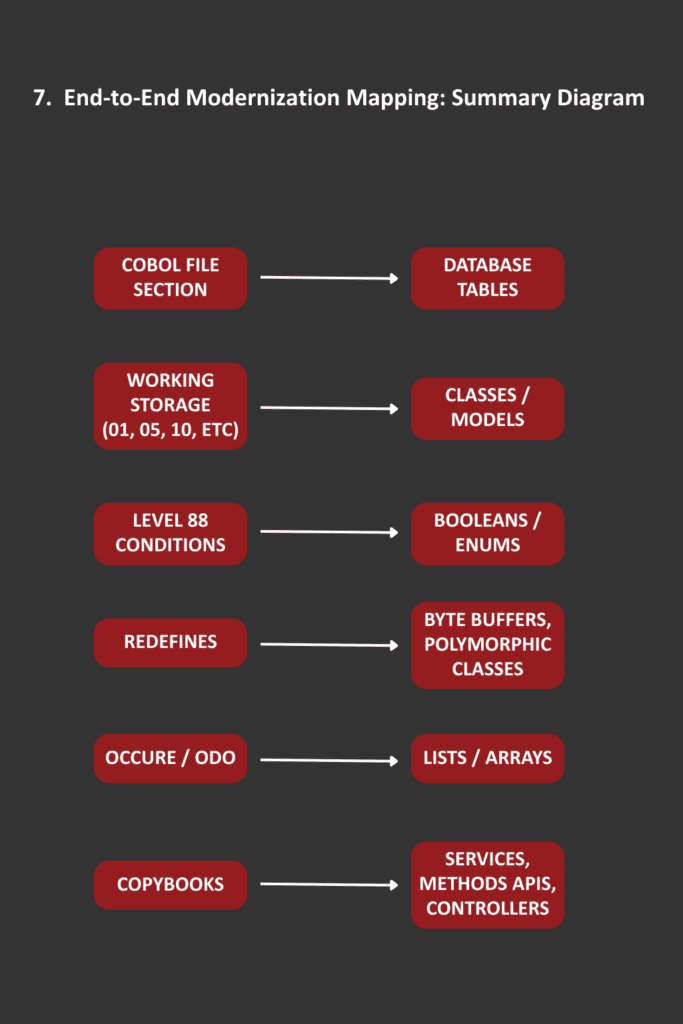
In Java or .NET, this becomes a class with fields. The challenge is preserving the binary layout when required. CORE recommends that any binary layout be refactored after the modernization process to reduce complexity and to help move applications forward in the future.
- REDEFINES
A REDEFINES clause lets one variable share memory with another. It is often used for:
- Unions
- Alternate record layouts
- Inspecting raw bytes
- Performance
- Type switching
Example:
01 WORK-BLOCK.
05 TOTAL-AMT PIC S9(9)V99.
05 FILLER REDEFINES TOTAL-AMT PIC X(12).
In Java or .NET, there is no shared-memory variable structure by default.
The modernization must choose between:
- Byte arrays with manual interpretation
- A hierarchy of classes that map to
the same buffer - Serialization logic that keeps offsets aligned
This is one of the most error-prone areas in modernization. The CORE framework hand
les these types of challenges in a centralized Data Access Object (DAO) for each entity/table references in the business application.
- Level 77 items
Level 77 variables are simple standalone
items. They are not part of a group.
They often represent counters, flags, or control fields.
Example:
77 END-OF-FILE PIC X.
In Java or .NET, these map to simple class fields or local variables.
However, their isolated nature may indica
te program-wide dependencies that must be traced.
- Level 88 condition names
Level 88 items define named conditions based on values of another field.
They add expressive meaning to flags without introducing new variables.
Example:
05 STATUS-CODE PIC X.
88 OK VALUE “0”.
88 NOT-OK VALUE “1”.
When converting, each 88 item should become an enumeration, boolean property, or helper method in Java or .NET. The CORE Framework handles 88 levels seamlessly with no changes to application code, preserving this valuable logic. Failure to preserve this logic will break validation and branching behavior.
- OCCURS tables
The OCCURS clause defines arrays or tables. Many are fixed size, but some use OCCURS DEPENDING ON (ODO), which allows the actual table size to vary at runtime. Modernize considerations:
- Fixed OCCURS maps easily to arrays or lists.
- ODO tables are more complex because COBOL stores actual content inside a fixed layout, but only part of the table is meaningful.
- ODO logic must be preserved when parsing from old files, because the dependent counter and the table length must stay in sync.

 What happens to the COPYBOOKS Section?
Most COBOL systems rely heavily on Copybooks. These files provide shared data structures such as records, database buffers, communication blocks, or error codes. Modernization considerations:
- Copybooks must be transformed into shared Java classes or C# classes.
- If a Copybook contains REDEFINES or ODO tables, those patterns must be copied exactly to ensure compatibility.
- One Copybook might be used in dozens of programs. An error in the generated class will affect the entire system.
- Some Copybooks include conditional compilation flags (COPY … REPLACING), which must be preserved or re-implemented.
In the modernization, Copybook analysis is one of the most important steps, because it defines the shape of the core data model.
The CORE migration process modernization Copybooks to command classes in the new application code. References to these Copybooks are integrated into the original program that references them. This centralizes the logic into a single class and ultimately improves maintainability of the application moving forward.

 Paragraphs and sections
Paragraphs act like named labels. Execution flows through PERFORM statements, often with loops and returns. In Java or .NET, this becomes structured methods, loops, and function calls.
Extra care is needed to avoid replicating GO TO behavior directly, which can lead to unreadable modern code.
The CORE migration process handles GO TO by first understanding the context of the GO TO and refactoring this code manually where necessary. Most GO TO’s are simple and are used to exit a loop or skip some code. Those we typically make if/else or Case statements and use Return to exit. Complex/bad ones, we generally restructure the code which is primarily a manual refactoring in our modernization process.
2. Implicit data usage
Many COBOL programs rely on global variables instead of passing parameters. This means the sequence of statements matters. In a modern architecture, you must restructure logic so that data is passed explicitly through method parameters, dependency injection, or service layers.
3. Error handling
COBOL error handling is often procedural, using file status codes or return codes. Java and C# use exceptions, strongly typed results, or return objects. Mapping this behavior requires careful review of every I/O operation.
4. Batch and transaction logic
Batch COBOL programs often process one record at a time. Java and .NET favor streaming, object collections, or frameworks such as Spring Batch or .NET Dataflow. The modernization must preserve logic while improving performance and maintainability. Where possible, the CORE Migration process improves record processing in a number of ways including joining tables in relational databases, moving IF selection criteria to SQL WHERE Clauses. These implementation makes the code easier to work with by new developers and improves performance.