
HP e3000 MODERNIZATION
Migrating off Legacy HP e3000 Platforms to Java or .NET
CORE helps organizations modernize HP e3000 MPE/iX applications, data and batch operations, preserving business logic while delivering scalable, secure, and modern solutions on platforms your teams know.
What We Modernize
- MPE/iX Applications
- IMAGE Databases
- COBOL & SPL
- Batch Job Streams
- TurboIMAGE Data
- Operational Workflows
HP e3000 Migration Services (MPE/iX and IMAGE to Java or .NET)
KEY MIGRATION CONSIDERATIONS
HP e3000 migration helps organizations modernize legacy MPE/iX applications, IMAGE databases, and business processes by moving to Java or .NET. The challenge is that the surrounding ecosystem has moved on: modern integration patterns, cloud hosting, DevOps delivery, security tooling, and talent availability all favor open systems and modern application stacks.
CORE'S APPROACH
CORE migrates HP e3000 applications and data to modern Java or Microsoft .NET platforms using an automation-first approach. We preserve business logic, modernize the architecture, and convert data structures (IMAGE, MPE files, KSAM and flat files) into relational and service-oriented designs that are easier to maintain, scale, and integrate.
What Makes HP e3000 Migration Unique
Database & Data Access Patterns
IMAGE network model, sets, chains, masters, details, intrinsic calls
Operational Workflows
Job streams, schedules, spooling, prints and reports
MPE File System Semantics
File attributes, account/group/user structure, and POSIX components where used
In other words, to “lift” an HP e3000 workload successfully, you must migrate the business outcomes the platform produces, not just the source code.
Target Platforms We Deliver
Java Modernization
Java, Spring Boot, REST APIs, batch services, modern RDBMS (Oracle, SQL Server, PostgreSQL), and a web UI (Angular or React).
.NET Modernization
C#/.NET 8, REST APIs, modern RDBMS (SQL Server or Oracle), and a React front end.
In both cases, the goal is the same: a clean separation of concerns (data access, business logic, presentation), automated testability, and DevOps-friendly deployment.
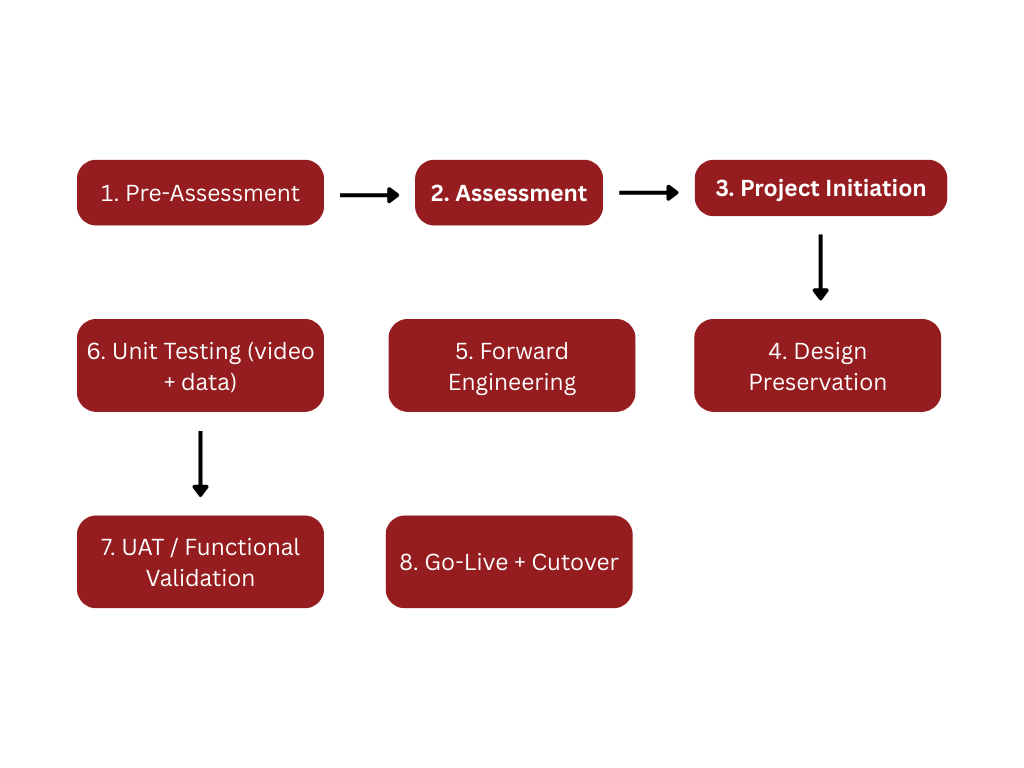
Migration Blueprint (CORE Process)
CORE applies a structured, iterative delivery model so you can test continuously and reduce risk. The same disciplined approach used on OpenVMS migrations applies here, with e3000-specific tooling and patterns.
DATA MIGRATION
Data Migration: IMAGE, MPE Files, and “Everything Around Them”
01
IMAGE (TurboIMAGE) Migration Strategy
IMAGE is a network model database where “sets” and “chains” represent relationships and access paths differently than a relational database. Applications often use intrinsic calls (DBOPEN, DBFIND, DBGET, DBPUT, DBUPDATE, DBINFO, etc.) as part of the program’s core logic.
CORE supports three common modernization paths:
1
Direct extract and load to a relational database (most common)
- Export schema and data from IMAGE
- Map IMAGE sets and fields to relational tables, keys, and indexes
- Load into SQL Server or Oracle
- Rewrite or regenerate the application’s data access layer to use SQL
2
Transitional replication for staged cutover
Maintain the e3000 as system of record while replicating data to a target RDBMS
- Validate results in parallel until cutover
- Useful when you need a phased application rollout
3
Transitional compatibility layers where required
In some situations, a compatibility approach can keep legacy intrinsic patterns intact while you modernize around them, then replace incrementally. Some commercial tools and approaches exist in the ecosystem for exporting or migrating TurboIMAGE content, including utilities that export to flat files for reloading elsewhere.
A pragmatic note: on HP e3000 migrations, the biggest hidden risk is not exporting the raw data. It is recreating the application’s access behavior and performance characteristics when IMAGE chains and sets were effectively serving as tuned access paths.
IMAGE to Relational Mapping (Conceptual)
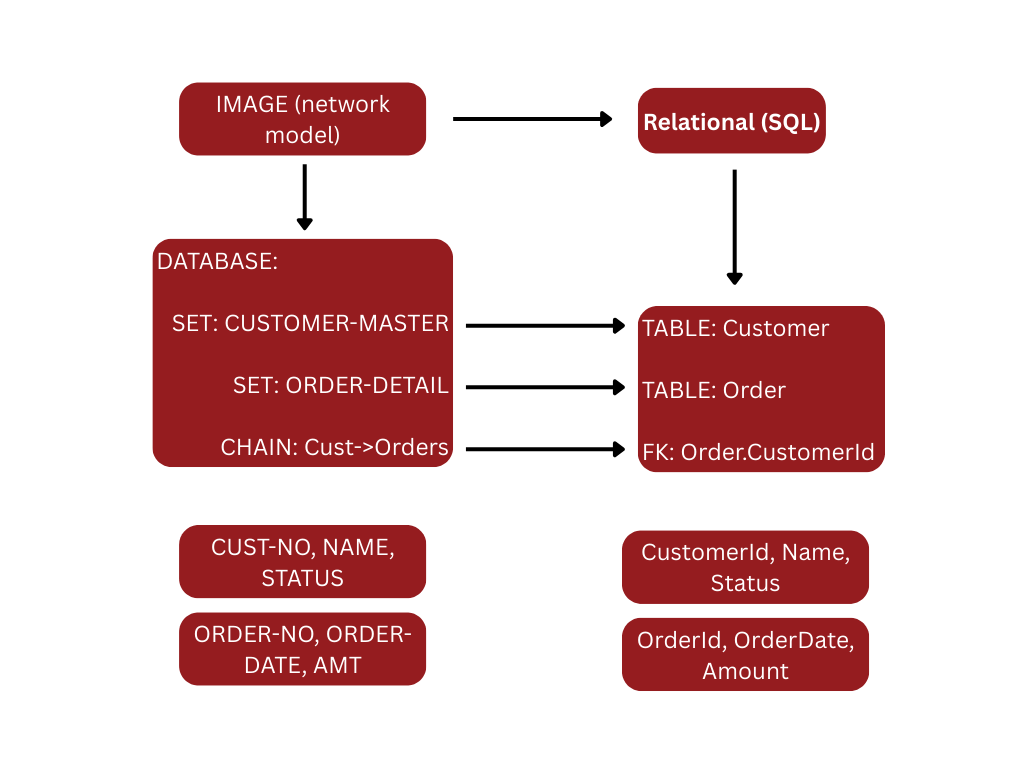
CORE performs this mapping with automation support, then validates record counts, totals, and key business invariants.
02
MPE Files, KSAM, and Flat Files
HP e3000 environments frequently contain more than IMAGE databases:
KSAM files (keyed sequential access)
Flat files used for batch input/output, interfaces, and reporting
Job stream inputs and intermediate data files
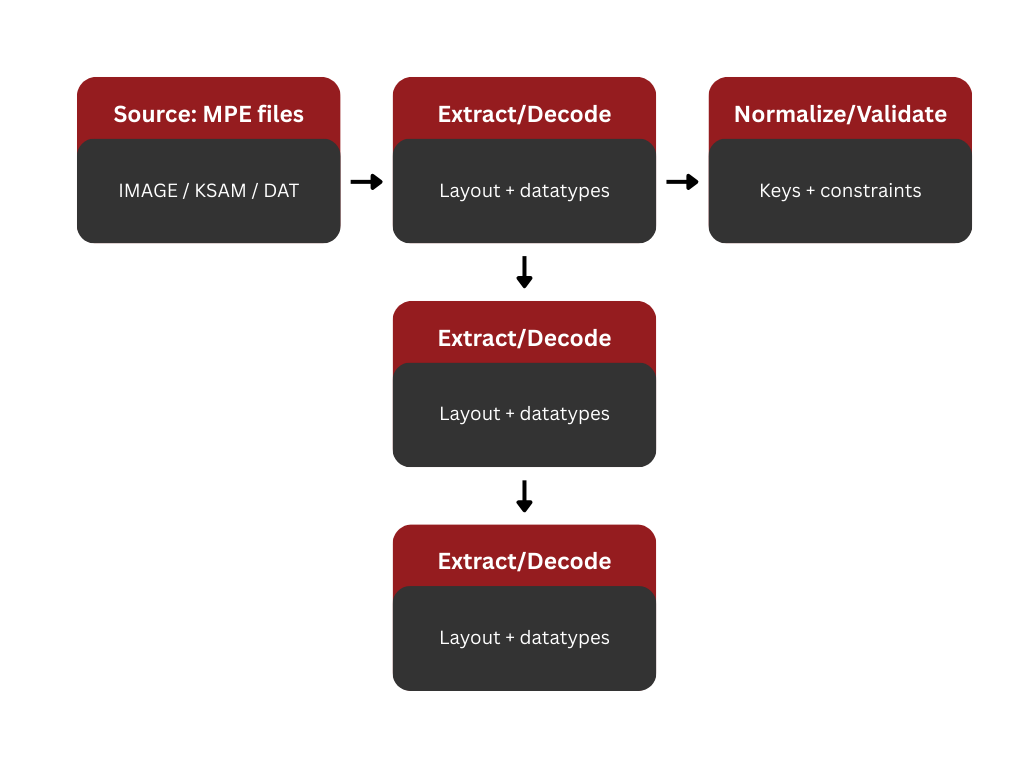
CORE’s approach is consistent regardless of format:
1
Identify file layouts (record definitions, packed/zoned numerics, byte offsets, code pages)
2
Build repeatable extract processes
3
Normalize and validate data
4
Load into the target platform (RDBMS tables, object storage, or integration services)
Some migration tooling in the HP 3000 ecosystem explicitly targets TurboIMAGE, KSAM, and flat files as sources for export into Oracle or SQL Server environments.
File Conversion Assembly Line
Batch, Job Streams, Reports, and Operational Equivalence
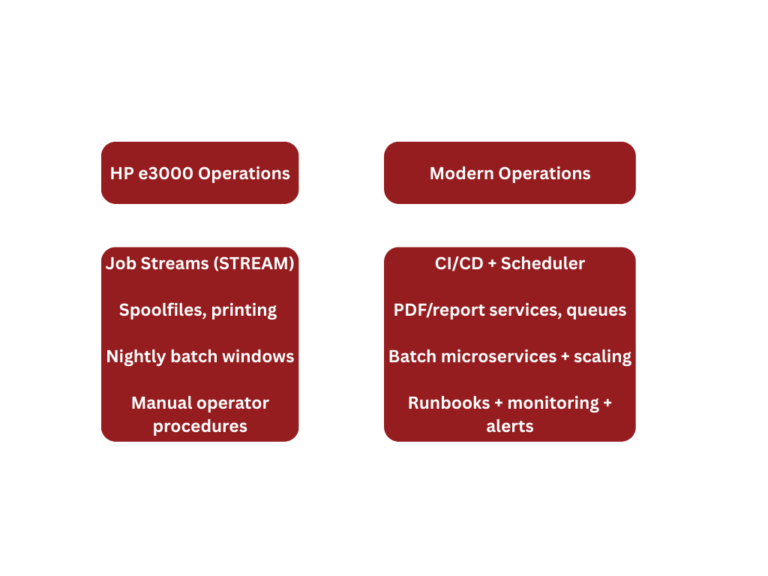
HP e3000 systems often live or die based on batch predictability. Job streams, schedules, spool files, and operational controls must be migrated as first-class artifacts. MPE provides commands for job control and spooling, such as STREAM, which spools batch jobs and data for execution.
CORE migrates operational behavior into modern equivalents such as:
Enterprise schedulers (Control-M, Autosys, Azure DevOps pipelines, Jenkins)
Container or VM scheduled jobs
Windows Task Scheduler or Linux cron where appropriate
Centralized logging and monitoring (structured logs, alerts, dashboards)
Operational Modernization View
HP e3000 Migration to Java or .NET
For most customers, a sustainable outcome means modernizing the codebase and architecture, not just recompiling. CORE typically delivers:
HP e3000 Migration Validation
HP e3000 modernization succeeds when the business trusts the result. CORE validation typically includes:
Record count reconciliation (by table, by key ranges, by date windows)
Financial and operational totals (balances, aging, summaries)
Controlled parallel runs (legacy and modern outputs compared)
Automated regression using real legacy data and recorded user workflows
This is especially important on HP e3000 migrations because “success” is often defined by batch outputs, reports, and downstream integrations that have been stable for decades.
Typical HP e3000 Migration Risks and How CORE Manages Them
Risk: Hidden data definitions
Many file layouts live in copybooks, dictionaries, or tribal knowledge. CORE mitigates this by inventorying layouts, profiling data, and enforcing repeatable extracts.
Risk: IMAGE access paths and performance
Network-model access behavior can be tightly coupled to application logic. We mitigate this by explicitly modeling access patterns and recreating appropriate relational keys and indexes.
Risk: Batch timing and sequencing dependencies
Operators and job streams often encode sequencing assumptions. We mitigate this by extracting schedules, dependencies, and restart ability requirements as explicit artifacts.
Risk: Cutover complexity
We mitigate this using staged conversions, reconciliation gates, and a cutover plan that includes rollback strategy where required.
What You Receive
A CORE HP e3000 migration engagement typically produces:
Migration assessment and delivery plan (scope, complexity, timeline)
Data conversion design (IMAGE and file mapping, validation strategy)
Automated build and deployment pipelines
Test evidence (unit, regression, reconciliation reports)
Cutover plan, go-live support, and post-go-live stabilization
Next Step
If your HP e3000 estate includes IMAGE (TurboIMAGE) databases, MPE files, KSAM, and long-running batch operations, the safest path forward is a structured migration that preserves business logic and validates data and outputs continuously.
CORE can start with a short pre-assessment to size the effort and identify the highest-risk areas, then proceed into a detailed assessment where we inventory programs, data stores, interfaces, and operational workflows and produce a measurable migration plan.
Ready to Modernize Legacy Applications?
Learn how CORE Migration can help modernize your legacy systems while preserving business logic and maintaining operational continuity.